Templating Guide
Relaye's templating system allows you to transform raw data from your inputs into well-formatted notifications for your outputs. This guide explains how to use templates effectively to create clear, informative notifications.
Introduction to Templating
When an input receives data, Relaye makes that data available as variables in your templates. Templates control how your notifications appear in their destination channels, allowing you to highlight important information and format it appropriately.
flowchart LR
    Raw[Raw JSON Data] -->|Variables| Template[Template]
    Template -->|Substitution| Result[Formatted Message]
Basic Templating
Relaye uses Liquid templating syntax combined with GitHub-flavored Markdown formatting. This approach allows you to write your templates once and have them work across all supported platforms (Telegram, Slack, Discord, email, etc.).
Variables
To include a value from your data, use double curly braces:
For nested data, use dot notation:
Example
If your webhook sends this JSON payload:
{
  "alert": {
    "name": "Database Connection Error",
    "severity": "high",
    "service": "payment-processor"
  },
  "detected_at": "2025-04-22T15:30:45Z"
}
Your template could look like:
## ⚠️ ALERT: {{ alert.name }}

**Severity**: {{ alert.severity }}
**Service**: {{ alert.service }}
**Detected**: {{ detected_at }}
And the resulting notification would be formatted appropriately for each platform, but would look similar to:
⚠️ ALERT: Database Connection Error
Severity: high Service: payment-processor Detected: 2025-04-22T15:30:45Z
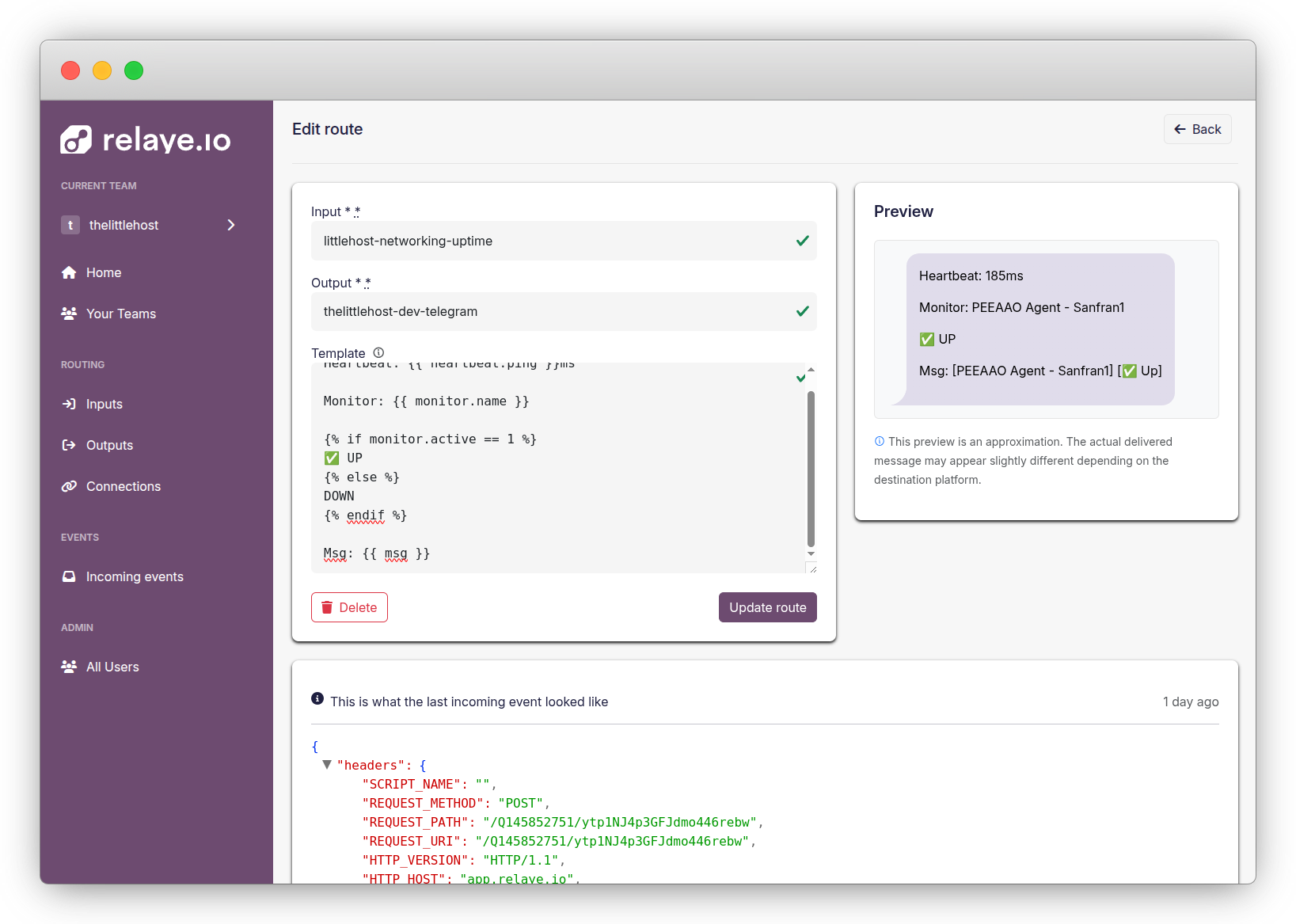
The template editor lets you write templates and see a preview of how they'll look.
Conditional Logic
Show or hide parts of your notification based on conditions:
{% if alert.severity == "critical" %}
# 🚨 CRITICAL ALERT - IMMEDIATE ACTION REQUIRED
{% elsif alert.severity == "high" %}
## ⚠️ HIGH PRIORITY ALERT
{% else %}
### ℹ️ Alert Notification
{% endif %}

{{ alert.name }}
Loops
Iterate through arrays of data:
### Affected Services:

{% for service in affected_services %}
- **{{ service.name }}**: {{ service.status }}
{% endfor %}
GitHub-Flavored Markdown Formatting
Relaye uses GitHub-flavored Markdown for all templates. Here are some common formatting options:
Headers
Text Styling
Lists
Code and Preformatted Text
Links
Tables
Tips for Effective Templates
- Start with important information: Put critical details at the beginning
- Use visual elements: Emojis and markdown formatting help information stand out
- Be concise: Keep notifications brief and focused on what matters
- Test with sample data: Use the preview feature to test with realistic data
- Handle edge cases: Account for missing data and unusual values
- Use conditional logic: Show different information based on context
- Keep it consistent: Use a consistent formatting style across all your templates
Troubleshooting Templates
Common Issues
Variable not appearing in output:
- Check the variable name and case
- Verify that the data exists in the incoming payload
- Use {% if variable %} to check if it exists before using it
Formatting not working: - Ensure you're using proper GitHub-flavored Markdown syntax - Check for missing closing tags or brackets - Test with minimal formatting to isolate the issue
Error in template:
- Look for syntax errors like missing %} or }}
- Check for incorrect filter names
- Verify that conditional statements are properly closed
Best Practices
- Documentation: Keep a library of your most useful templates
- Standardization: Use consistent formatting across similar notifications
- Testing: Test your templates with various data scenarios
- Updates: Review and update templates as your notification needs evolve
- Feedback: Collect feedback from recipients to improve clarity
- Versioning: Keep track of template changes, especially for critical alerts
By following these guidelines and using the templating features effectively, you'll create clear, informative notifications that help your team respond quickly and appropriately to important events.